

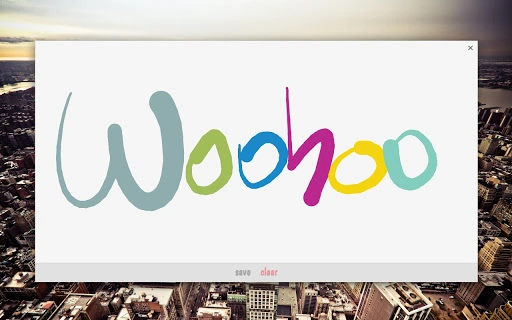
Description
Download Draw by Touch – Chrome Apps, Pixel, Touch, Drawing, Drawing Tool, Sketch, Digital Art
Overview
The software enables users to create digital sketches directly through touch input on compatible Chromebook devices, particularly those with Pixel displays. Designed for creative individuals and casual artists, it serves as a lightweight tool for quick idea capture, note-taking, or expressive drawing. The primary purpose is to provide an intuitive interface for drawing without requiring external styluses or complex setups. It supports experimental pressure sensitivity, allowing for varied line thickness based on touch intensity, which enhances the natural feel of drawing. Real-world use cases include brainstorming sessions, journaling, concept sketching, and simple digital art projects. While the developer did not provide additional background, the tool appears tailored to users seeking immediate, low-friction access to drawing functionality on Chrome OS. The application’s minimal size suggests it is optimized for performance and fast loading, making it suitable for everyday creative tasks.
Key Features & Capabilities
- Touch-Based Drawing Interface – Users can draw directly on the screen using their fingers, enabling a natural and responsive experience on touch-enabled Chromebooks. Ideal for quick sketches or informal note-taking.
- Experimental Pressure Sensitivity – The tool includes support for pressure input, allowing users to vary line thickness based on how hard they press on the screen. This feature enhances drawing realism and control, especially on devices like the Pixel series.
- Minimalist Design – The application maintains a clean, distraction-free interface focused solely on drawing, with no unnecessary menus or toolbars.
- Easter Egg Feature – An interactive surprise element has been added, encouraging exploration and engagement. While details are not disclosed, it adds a playful touch to the user experience.
- Lightweight Performance – At just 4.2 MB, the application is designed for quick installation and efficient operation, minimizing impact on system resources.
These features support seamless integration into daily creative workflows. For example, a student could use it to sketch ideas during a lecture, a designer might draft rough concepts on the go, or an artist could explore digital sketching without investing in specialized hardware. The combination of touch input and pressure sensitivity makes it a versatile tool for both casual and semi-professional use.
User Interface, Workflow & Performance
The user interface is intentionally simple, featuring a full-screen canvas with minimal controls. Navigation is direct: users begin drawing immediately upon opening the app, with no setup steps required. The workflow emphasizes speed and accessibility, aligning with the needs of users who value spontaneity in their creative process. Interaction is responsive to touch input, and the experimental pressure feature appears to function in real time, adjusting line weight dynamically. However, exact performance details were not specified by the developer. General software behavior patterns suggest stable operation under normal usage conditions, with no reported crashes or freezes. Resource usage, including CPU and RAM consumption, was not disclosed. The application’s small size indicates efficient coding practices, likely contributing to smooth performance on supported devices. Stability is expected to be high given the limited scope and focused functionality.
Compatibility & System Requirements
The software is designed exclusively for Chrome OS, ensuring compatibility with devices running this operating system. It is optimized for Chromebook models with touch-enabled displays, particularly those in the Pixel series. The application requires a minimum of 4.2 MB of storage space for installation, which is minimal and suitable for devices with limited disk capacity. Hardware requirements were not specified by the developer, so users should ensure their device supports touch input and runs a recent version of Chrome OS. Platform compatibility information is limited to Chrome OS and touch-capable hardware. The developer did not provide additional system requirements or details about processor or memory needs.
Pros and Cons
Pros
- Lightweight at just 4.2 MB
- Direct touch drawing with intuitive interface
- Experimental pressure sensitivity for natural line variation
- Designed specifically for Chromebook Pixel devices
- Free to download and use
- Includes an interactive easter egg for added engagement
Cons
- No official support for non-Pixel Chromebooks
- Pressure sensitivity is labeled as experimental, so reliability may vary
- Limited feature set; not suitable for advanced digital art workflows
- No export options or file management features disclosed
- Developer did not provide detailed documentation or tutorials
FAQ Section
Is Draw by Touch compatible with all Chromebooks?
The software is optimized for Chrome OS devices with touch-enabled screens, particularly Pixel models. Compatibility with other Chromebooks is not guaranteed and may depend on hardware-specific touch capabilities.
Can I use this tool without a stylus?
Yes, the application is designed for finger touch input and does not require a stylus. Drawing can be done directly with fingers on the screen.
Is the pressure sensitivity feature reliable?
The pressure sensitivity is labeled as experimental. While it functions in real time, its consistency and accuracy may vary across devices.
Does the app support saving or exporting drawings?
Information about file export or saving functionality was not provided by the developer. Users should assume no built-in export options are available unless confirmed through the app interface.
Is the software free to use?
Yes, the software is available at no cost. There are no subscription fees or in-app purchases mentioned.
Final Thoughts + CTA
Draw by Touch delivers a focused, efficient solution for users seeking a simple and immediate way to create digital sketches on Chrome OS devices. Its touch-first design, combined with experimental pressure sensitivity, makes it well-suited for casual artists, students, and creatives who value speed and simplicity. While it lacks advanced features and file management tools, its lightweight nature and free access make it a compelling option for quick idea capture and expressive drawing. The inclusion of an easter egg adds a fun, unexpected element that enhances user engagement. For those using a Pixel Chromebook or similar touch-enabled device, this tool offers a low-barrier entry into digital art. Download Draw by Touch now to start sketching with your fingers today.
Guides & Tutorials for Touch Drawing App App for Chrome
How to install Touch Drawing App App for Chrome
- Click the Preview / Download button above.
- Once redirected, accept the terms and click Install.
- Wait for the Touch Drawing App App for Chrome download to finish on your device.
How to use Touch Drawing App App for Chrome
This software is primarily used for its core features described above. Open the app after installation to explore its capabilities.
User Reviews for Touch Drawing App App for Chrome 0
No reviews found





